 Fluentd
Output Plugins
Fluentd has 6 types of plugins: Input, Parser, Filter, Output, Formatter and Buffer. This article gives an overview of Output Plugin.
Overview
There are three types of output plugins: Non-Buffered, Buffered, and Time Sliced.
Non-Buffered output plugins do not buffer data and immediately
write out results.
Buffered output plugins maintain a queue of chunks (a chunk is a
collection of events), and its behavior can be tuned by the "chunk
limit" and "queue limit" parameters (See the diagram below).
Time Sliced output plugins are in fact a type of Bufferred plugin,
but the chunks are keyed by time (See the diagram below).
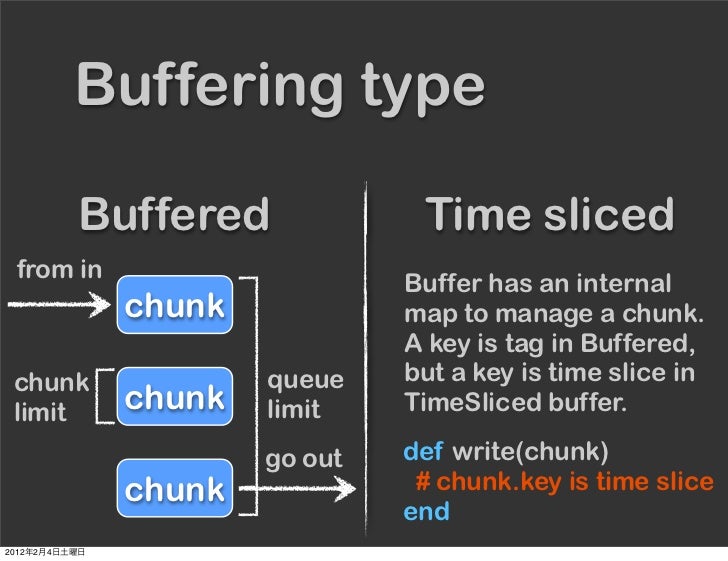
The output plugin's buffer behavior (if any) is defined by a separate Buffer plugin. Different buffer plugins can be chosen for each output plugin. Some output plugins are fully customized and do not use buffers.
List of Non-Buffered Output Plugins
List of Buffered Output Plugins
List of Time Sliced Output Plugins
Other Plugins
Please refer to this list of available plugins to find out about other Output plugins.
Buffered Output Parameters
For advanced usage, you can tune Fluentd's internal buffering mechanism with these parameters.
buffer_type
The buffer type is memory by default (buf_memory) for the ease of testing, however file (buf_file) buffer type is always recommended for the production deployments. If you use file buffer type, buffer_path parameter is required.
buffer_queue_limit, buffer_chunk_limit
The length of the chunk queue and the size of each chunk, respectively. Please see the Buffer Plugin Overview article for the basic buffer structure. The default values are 64 and 8m, respectively. The suffixes "k" (KB), "m" (MB), and "g" (GB) can be used for buffer_chunk_limit.
flush_interval
The interval between data flushes. The default is 60s. The suffixes "s" (seconds), "m" (minutes), and "h" (hours) can be used.
flush_at_shutdown
If set to true, Fluentd waits for the buffer to flush at shutdown. By default, it is set to true for Memory Buffer and false for File Buffer.
retry_wait, max_retry_wait
The initial and maximum intervals between write retries. The default values are 1.0 seconds and unset (no limit). The interval doubles (with +/-12.5% randomness) every retry until max_retry_wait is reached.
Since td-agent will retry 17 times before giving up by default (see the retry_limit parameter for details), the sleep interval can be up to approximately 131072 seconds (roughly 36 hours) in the default configurations.
retry_limit, disable_retry_limit
The limit on the number of retries before buffered data is discarded, and an option to disable that limit (if true, the value of retry_limit is ignored and there is no limit). The default values are 17 and false (not disabled). If the limit is reached, buffered data is discarded and the retry interval is reset to its initial value (retry_wait).
num_threads
The number of threads to flush the buffer. This option can be used to parallelize writes into the output(s) designated by the output plugin. Increasing the number of threads improves the flush throughput to hide write / network latency. The default is 1.
slow_flush_log_threshold
The threshold for checking chunk flush performance. The default value is 20.0 seconds. Note that parameter type is float, not time.
If chunk flush takes longer time than this threshold, fluentd logs warning message like below:
2016-12-19 12:00:00 +0000 [warn]: buffer flush took longer time than slow_flush_log_threshold: elapsed_time = 15.0031226690043695 slow_flush_log_threshold=10.0 plugin_id="foo"
secondary output
At Buffered output plugin, the user can specify <secondary> with any output plugin in <match> configuration. If the retry count exceeds the buffer's retry_limit (and the retry limit has not been disabled via disable_retry_limit), then buffered chunk is output to <secondary> output plugin.
<secondary> is useful for backup when destination servers are unavailable, e.g. forward, mongo and other plugins. We strongly recommend out_file plugin for <secondary>.
Time Sliced Output Parameters
For advanced usage, you can tune Fluentd's internal buffering mechanism with these parameters.
time_slice_format
The time format used as part of the file name. The following characters are replaced with actual values when the file is created:
- \%Y: year including the century (at least 4 digits)
- \%m: month of the year (01..12)
- \%d: Day of the month (01..31)
- \%H: Hour of the day, 24-hour clock (00..23)
- \%M: Minute of the hour (00..59)
- \%S: Second of the minute (00..60)
The default format is %Y%m%d%H, which creates one file per hour.
time_slice_wait
The amount of time Fluentd will wait for old logs to arrive. This is used to account for delays in logs arriving to your Fluentd node. The default wait time is 10 minutes ('10m'), where Fluentd will wait until 10 minutes past the hour for any logs that occurred within the past hour.
For example, when splitting files on an hourly basis, a log recorded at 1:59 but arriving at the Fluentd node between 2:00 and 2:10 will be uploaded together with all the other logs from 1:00 to 1:59 in one transaction, avoiding extra overhead. Larger values can be set as needed.
buffer_type
The buffer type is file by default (buf_file). The memory (buf_memory) buffer type can be chosen as well. If you use file buffer type, buffer_path parameter is required.
buffer_queue_limit, buffer_chunk_limit
The length of the chunk queue and the size of each chunk, respectively. Please see the Buffer Plugin Overview article for the basic buffer structure. The default values are 64 and 8m, respectively. The suffixes "k" (KB), "m" (MB), and "g" (GB) can be used for buffer_chunk_limit.
flush_interval
The interval between data flushes. The default is 60s. The suffixes "s" (seconds), "m" (minutes), and "h" (hours) can be used.
flush_at_shutdown
If set to true, Fluentd waits for the buffer to flush at shutdown. By default, it is set to true for Memory Buffer and false for File Buffer.
retry_wait, max_retry_wait
The initial and maximum intervals between write retries. The default values are 1.0 and unset (no limit). The interval doubles (with +/-12.5% randomness) every retry until max_retry_wait is reached.
Since td-agent will retry 17 times before giving up by default (see the retry_limit parameter for details), the sleep interval can be up to approximately 131072 seconds (roughly 36 hours) in the default configurations.
retry_limit, disable_retry_limit
The limit on the number of retries before buffered data is discarded, and an option to disable that limit (if true, the value of retry_limit is ignored and there is no limit). The default values are 17 and false (not disabled). If the limit is reached, buffered data is discarded and the retry interval is reset to its initial value (retry_wait).
num_threads
The number of threads to flush the buffer. This option can be used to parallelize writes into the output(s) designated by the output plugin. The default is 1.
slow_flush_log_threshold
Same as Buffered Output but default value is changed to 40.0 seconds.
If this article is incorrect or outdated, or omits critical information, please let us know. Fluentd is a open source project under Cloud Native Computing Foundation (CNCF). All components are available under the Apache 2 License.