 Fluentd
Store Apache Logs into MongoDB
This article explains how to use Fluentd's MongoDB Output plugin (out_mongo) to aggregate semi-structured logs in real-time.
Background
Fluentd is an advanced open-source log collector originally developed at Treasure Data, Inc. Because Fluentd handles logs as semi-structured data streams, the ideal database should have strong support for semi-structured data. There are several candidates that meet this criterion, but we believe MongoDB is the market leader.
MongoDB is an open-source, document-oriented database developed at 10gen, Inc. It is schema-free and uses a JSON-like format to manage semi-structured data.
This article will show you how to use Fluentd to import Apache logs into MongoDB.
Mechanism
The figure below shows how things will work.
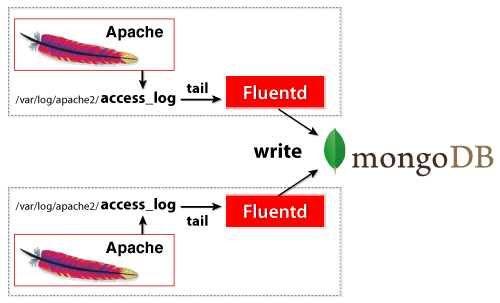
Fluentd does 3 things:
- It continuously "tails" the access log file.
It parses the incoming log entries into meaningful fields (such as
ip,path, etc.) and buffers them.It writes the buffered data to MongoDB periodically.
Install
For simplicity, this article will describe how to set up an one-node configuration. Please install the following software on the same node.
- Fluentd
- MongoDB Output Plugin
- MongoDB
- Apache (with the Combined Log Format)
The MongoDB Output plugin is included in the latest version of Fluentd's deb/rpm package. If you want to use Ruby Gems to install the plugin, please use gem install fluent-plugin-mongo.
For MongoDB, please refer to the following downloads page.
Configuration
Let's start configuring Fluentd. If you used the deb/rpm package, Fluentd's config file is located at /etc/td-agent/td-agent.conf. Otherwise, it is located at /etc/fluentd/fluentd.conf.
Tail Input
For the input source, we will set up Fluentd to track the recent Apache logs (typically found at /var/log/apache2/access_log) The Fluentd configuration file should look like this:
<source>
  @type tail
  format apache2
  path /var/log/apache2/access_log
  pos_file /var/log/td-agent/apache2.access_log.pos
  tag mongo.apache.access
</source>
Please make sure that your Apache outputs are in the default \'combined\' format. `format apache2` cannot parse custom log formats. Please see the in_tail article for more information.
Let's go through the configuration line by line.
type tail: The tail Input plugin continuously tracks the log file.This handy plugin is included in Fluentd's core.
format apache2: Uses Fluentd's built-in Apache log parser.path /var/log/apache2/access_log: The location of the Apache log.This may be different for your particular system.
tag mongo.apache.access:mongo.apache.accessis used as the tagto route the messages within Fluentd.
That's it! You should now be able to output a JSON-formatted data stream for Fluentd to process.
MongoDB Output
The output destination will be MongoDB. The output configuration should look like this:
<match mongo.**>
  # plugin type
  @type mongo

  # mongodb db + collection
  database apache
  collection access

  # mongodb host + port
  host localhost
  port 27017

  # interval
  flush_interval 10s

  # make sure to include the time key
  include_time_key true
</match>
The match section specifies the regexp used to look for matching tags. If a matching tag is found in a log, then the config inside <match>...</match> is used (i.e. the log is routed according to the config inside). In this example, the mongo.apache.access tag (generated by tail) is always used.
The ** in mongo.** matches zero or more period-delimited tag parts (e.g. mongo/mongo.a/mongo.a.b).
flush_interval specifies how often the data is written to MongoDB. The other options specify MongoDB's host, port, db, and collection.
For additional configuration parameters, please see the MongoDB Output plugin article. If you are using ReplicaSet, please see the MongoDB ReplicaSet Output plugin article.
Test
To test the configuration, just ping the Apache server. This example uses the ab (Apache Bench) program.
$ ab -n 100 -c 10 http://localhost/
Then, access MongoDB and see the stored data.
$ mongo
> use apache
> db["access"].findOne();
{ "_id" : ObjectId("4ed1ed3a340765ce73000001"), "host" : "127.0.0.1", "user" : "-", "method" : "GET", "path" : "/", "code" : "200", "size" : "44", "time" : ISODate("2011-11-27T07:56:27Z") }
{ "_id" : ObjectId("4ed1ed3a340765ce73000002"), "host" : "127.0.0.1", "user" : "-", "method" : "GET", "path" : "/", "code" : "200", "size" : "44", "time" : ISODate("2011-11-27T07:56:34Z") }
{ "_id" : ObjectId("4ed1ed3a340765ce73000003"), "host" : "127.0.0.1", "user" : "-", "method" : "GET", "path" : "/", "code" : "200", "size" : "44", "time" : ISODate("2011-11-27T07:56:34Z") }
Conclusion
Fluentd + MongoDB makes real-time log collection simple, easy, and robust.
Learn More
If this article is incorrect or outdated, or omits critical information, please let us know. Fluentd is a open source project under Cloud Native Computing Foundation (CNCF). All components are available under the Apache 2 License.