 Fluentd
Performance Tuning Multi Process
This article desdrivbes how to optimize Fluentd's performance with in_multiprocess plugin. With high traffic, Fluentd tends to be more CPU bound.
However with Ruby MRI's GVL (Global VM Lock) limitation, Fluentd can use only single CPU core. With in_multiprocessm Fluentd can fully utilize multiple CPU cores to handle more requests.
Before you have multi-process configuration, please make sure you have done all the optimization you can do with single process.
2-Tier Process Topology
In multi-process environment, we recommend to have the following 2-tier process topology within the same server.
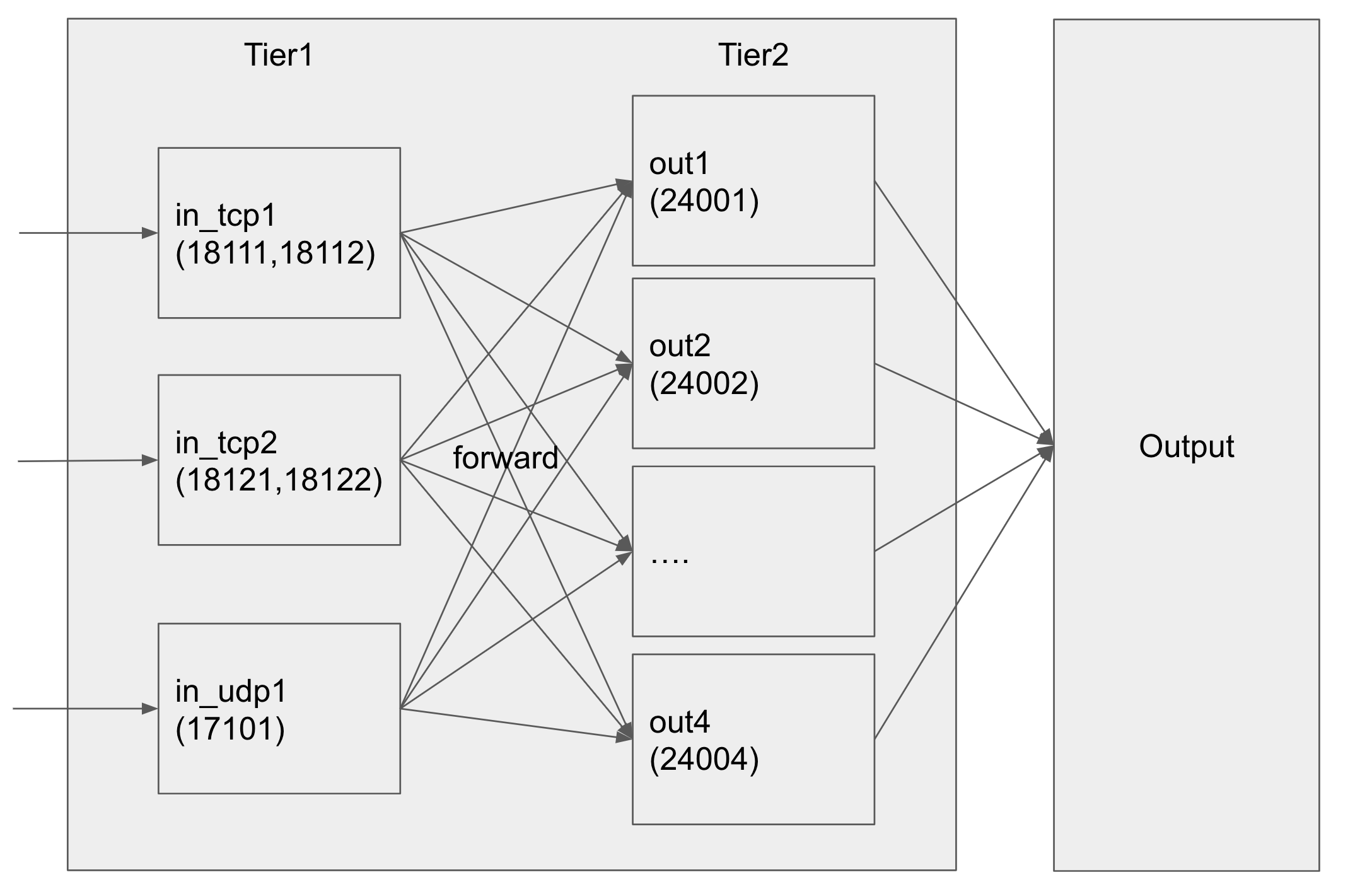
1st Tier: Input Processes
These processes will be in charge for input (typicall either in_tail or other input plugins) and its parsing. The input processes will transfer all the records to 2nd tier output processes, by out_forward.
In the config, it will be recommended to use shorter flush_interval (e.g. 1s) with smaller buffer_chunk_size (e.g. 1MB) to immediately forward incoming data to 2nd tier output processes.
2nd Tier: Output Processes
These process will be in charge for filter and output to your favorite destinations. The output processes accept incoming data from input processes, by in_forward.
The output processes are shared across all input processes, by out_forward's load balancing mechanism. In this way, you can simply add more output processes to handle more capacity across all inputs.
Reasons behind this Design
There are coupole of reasons why we recommend this design.
Focus
Each process can use nearly 100% of its CPU with much smaller focus (either input or output). For example, in_tail can now focus on tailing and parsing, rather than sharing the CPU power for filtering and output.
Scale
To handle more volume, you can simply add more input and output processes. in_forward and out_forward automatically distribute the load across the processes automatically.
Robust
If any of the process goes down, the supervisor process will automatically relaunch the process. Also we recommend to use buf_file for both input and output processes, to simply prevent losing the data.
For example, even if one of the output processes die, the data gets buffered and routed to different output processes automatically. Also crashed processes will be automaticlaly relaunched by supervisor process.
Example Configuration
This git repository contains the fully functional multi-process settings for Fluentd.
You can simply test with td-agent, or directly use Ruby to launch Fluentd.
$ bundle install
$ bundle exec fluentd -c fluentd.conf
Files
fluentd.conf (Supervisor)
This config uses in_multiprocess to launch both input and output processes.
in_*.conf (1st Tier Input Processes)
The example config contains 3 input processes: in_tcp1.conf, in_tcp2.conf, and in_udp1.conf.
These input processes will focus on receiving the data via either TCP or UDP, and sipmly forward to 2nd tier output processes.
out_*.conf (2nd Tier Output Processes)
The example config contains 4 output processes: out1.conf, out2.conf, out3.conf, out4.conf.
These output processes receive data from input processes, apply filters, and output to the destinations.
./tmpl/ directory has the config generation script, in case you'd like to increase the processes.
$ bash gen_out.sh
monitoring_*.conf (Monitoring)
These files are used to collect metrics from Fluentd, and exposing the metrics to Prometheus monitoring system. The repository also has ./prometheus directory, which contains example prometheus.yml configuration.
How to add input processes?
Please add in_xyz.conf. Please make sure you have <match> section, to forward incoming data to 2nd tier output processes. Finally, register the process in fluentd.conf.
How to add output processes?
Please add out_N.conf, and register the process in both options_forward.conf and fluentd.conf which list up all the output processes.
How many processes should we have?
We recommend to have approximately similar number of total processes with your CPU cores.
When you perform the benchmark, please carefully look at which processes are the bottleneck. Please add the processes depending on its resource usages.
Fluentd v1.0 or Later
Fluentd v1.0 or later has native multi-process support. We recommend you to upgrade to simplify the config file if possible.
If this article is incorrect or outdated, or omits critical information, please let us know. Fluentd is a open source project under Cloud Native Computing Foundation (CNCF). All components are available under the Apache 2 License.